What is Requirements Gathering?
 Sergii Guslystyi · Updated · 17 min read

Picture a familiar scenario: a business stakeholder asks for a “simple customer portal,” but six months later, the delivered software looks nothing like what they expected. The budget is exhausted, deadlines are missed, and the development team is frustrated by constantly changing expectations. This disconnect is the most common reason software projects fail.
Drawing from years of professional engineering experience, we know that building great software doesn’t start with writing code; it starts with understanding the exact problem you are trying to solve. In this article, we will explain exactly what is requirements gathering, why it matters, and how successful teams do it effectively to turn vague ideas into precise, launch-ready digital products.
Key Takeaways
- It is the foundation of development: Requirements gathering is the structured process of defining exactly what a software product must do before any coding begins.
- It prevents expensive rework: Identifying and fixing a misunderstood feature during the gathering phase costs significantly less than fixing it after the software is built.
- It requires a team effort: Successful gathering involves continuous collaboration between business stakeholders, project managers, business analysts, and the technical team.
- It uses diverse techniques: Professionals use various requirements gathering techniques, including interviews, workshops, surveys, and user observation, to uncover hidden needs.
- The output is a clear roadmap: The process results in approved documentation (like a Software Requirements Specification) that serves as the single source of truth for the project.
Definition of Requirements Gathering
Requirements gathering is the systematic process of researching, discovering, capturing, and defining the features, functions, and constraints of a proposed software system. It is crucial to understand that requirements gathering in software engineering is a highly managed, analytical process - not simply writing down a stakeholder’s “wishlist.” Users often know what they want, but they rarely know what they actually need from a technical standpoint. Gathering bridges that gap by transforming raw business desires into structured, actionable engineering tasks.
To achieve this, the process relies on three key actions:
- Discover: Actively uncovering hidden needs and constraints through stakeholder engagement.
- Document: Translating those needs into clear, unambiguous, and structured formats.
- Agree: Ensuring all parties review and officially approve the defined scope to prevent future conflicts.
Ultimately, requirements gathering acts as the architectural blueprint for your software. Without it, developers are forced to guess business intentions, leading to misaligned products. By implementing a rigorous gathering phase, organizations ensure that every line of code written directly contributes to a validated business goal.
Requirements Gathering vs. Requirements Elicitation vs. Requirements Analysis
In the software industry, you will often hear terms like gathering, elicitation, and analysis used interchangeably. However, to execute a project effectively, it is important to understand the subtle but critical differences between these three concepts. “Gathering” implies that requirements are just sitting there waiting to be picked up, while “elicitation” acknowledges that true requirements often need to be coaxed out of stakeholders. “Analysis” is what happens after the raw data is collected.
| Comparison parameter | Requirements Gathering | Requirements Elicitation | Requirements Analysis |
|---|---|---|---|
| Goal | To collect all stated needs, documents, and requests into one centralized place. | To draw out hidden, unstated, or assumed needs directly from the users and stakeholders. | To evaluate the collected data for clarity, feasibility, conflicts, and completeness. |
| Core question it answers | “What do the stakeholders say they want the software to do?” | “What is the underlying problem the stakeholders are actually trying to solve?” | “Are these requests technically possible, logical, and within the project budget?” |
| Typical activities | Reviewing legacy documentation, sending surveys, compiling feature requests. | Conducting one-on-one interviews, hosting brainstorming workshops, user observation. | Creating data flow diagrams, resolving conflicting requests, estimating technical effort. |
| Result | A raw, comprehensive list of user requests and business desires. | Deep insights into user workflows, pain points, and undocumented constraints. | Structured, prioritized, and validated software requirements ready for development. |
| When it happens in the process | The very beginning of the project lifecycle. | Concurrently with gathering, focusing heavily on interactive discovery. | Immediately after gathering/elicitation and right before final approval. |
Understanding this distinction is vital. If a team only “gathers” without “eliciting,” they will build exactly what the client asked for, which often turns out to be the wrong solution. If they do both but skip “analysis,” the development team will inherit impossible or conflicting tasks. A successful project requires all three disciplines working in harmony.
Why Requirements Gathering Matters

Skipping or rushing the requirements phase is the fastest way to sabotage a software project. High-quality requirements gathering is the ultimate risk management tool. It aligns the business’s strategic vision with the development team’s technical execution, ensuring that money and time are not wasted on features nobody needs. When teams know how to gather requirements properly, they drastically reduce the chance of expensive rework, missed deadlines, and overall project failure.
Specific benefits of effective requirements gathering include:
- Reduces misunderstandings: Creates a shared vocabulary so developers and business leaders are speaking the same language.
- Prevents scope creep: Establishes clear boundaries of what is included in the project (and, just as importantly, what is not).
- Improves cost estimation: Allows project managers to provide highly accurate budgets and timelines based on concrete deliverables.
- Enhances user satisfaction: Ensures the final product actually solves the end-users’ daily problems, driving higher adoption rates.
- Minimizes rework: Identifies logical flaws and impossible requests before engineers spend hundreds of hours writing code.
In short, investing time in the requirements gathering process pays massive dividends. Every hour spent clarifying a requirement upfront saves ten hours of rewriting code, redesigning databases, and apologizing to frustrated users down the line.
Who Is Involved: Roles and Responsibilities
A common misconception is that requirements gathering is solely the job of a business analyst. In reality, it is a deeply collaborative effort that requires input from various perspectives to ensure the software is viable, desirable, and technically feasible.
| Role | Primary responsibility | Inputs / Knowledge | Typical result / Artifacts |
|---|---|---|---|
| Stakeholders (Clients/Users) | Provide the business context, goals, budget, and daily pain points. | Industry knowledge, business workflows, desired outcomes. | Business requirements, user feedback, final project sign-off. |
| Product Owner / PM | Guide the vision, manage the project scope, and balance budget constraints. | Market strategy, project timeline, ROI expectations. | Product roadmap, prioritized product backlog. |
| Business Analyst (BA) | Extract, translate, and document the needs into actionable items. | Elicitation techniques, analytical skills, process mapping. | Software Requirements Specification (SRS), User Stories. |
| UX/UI Designer | Ensure the requirements translate into a logical, user-friendly interface. | Human-computer interaction, design thinking, accessibility. | Wireframes, user journey maps, interactive prototypes. |
| Tech Lead / Architect | Validate technical feasibility and define system architecture. | Technical constraints, security standards, system integrations. | Non-functional requirements, technical architecture diagrams. |
| QA / Tester | Ensure every requirement is testable and clear. | Edge cases, testing methodology, quality standards. | Acceptance criteria, preliminary test plans. |
The key to a smooth process is early involvement. If you wait to involve the Tech Lead until after the requirements are approved, you risk discovering that a requested feature is technically impossible. Similarly, involving QA early ensures that requirements are written with clear, measurable acceptance criteria, eliminating ambiguity before development starts.
Types of Software Requirements
Not all requirements are created equal. If a team only focuses on what the software does (clicking buttons, sending emails), they will inevitably miss how well it performs or why it is being built in the first place. Comprehensive software requirements are categorized into distinct types to ensure every angle of the product is covered.
| Requirement type | Example | Approver |
|---|---|---|
| Business requirements | “The system must reduce customer support call volume by 20% within six months.” | Executive Sponsor / Client |
| Functional requirements | “The user must be able to reset their password via an email link.” | Product Owner / Business Analyst |
| Non-functional requirements | “The password reset email must be delivered within 2 seconds of the request.” | Tech Lead / System Architect |
Business Requirements
Business requirements define the high-level goals, objectives, and needs of the organization. They answer the question, “Why are we undertaking this project?” They are not concerned with software features, but rather with business outcomes, such as increasing revenue, entering a new market, or achieving regulatory compliance. Examples: “Automate the invoicing process to save 40 hours of manual labor per week,” or “Achieve SOC2 compliance to unlock enterprise sales.”
Functional Requirements
Functional requirements describe specific behaviors, actions, and features the system must execute. They answer the question, “What must the system do?” This is the most common type of requirement and dictates how users will interact with the software. Examples: “The system shall allow users to filter search results by date and price,” or “The admin dashboard must generate a monthly sales report in CSV format.”
Non-Functional Requirements
Non-functional requirements (NFRs) specify the quality attributes, performance metrics, and constraints of the system. They answer the question, “How well must the system perform its functions?” NFRs cover crucial areas like security, scalability, usability, and speed. Examples: “The application must support 10,000 concurrent users without degrading performance,” or “All user passwords must be encrypted using AES-256.”
By capturing all three types of requirements, development teams ensure they are building a product that is not only feature-rich but also secure, fast, and strategically aligned with the company’s ultimate business goals.
Requirements Gathering Process
While the specific flow may vary slightly depending on the project methodology (Agile vs. Waterfall) and the size of the team, a standard requirements gathering process follows a logical sequence.
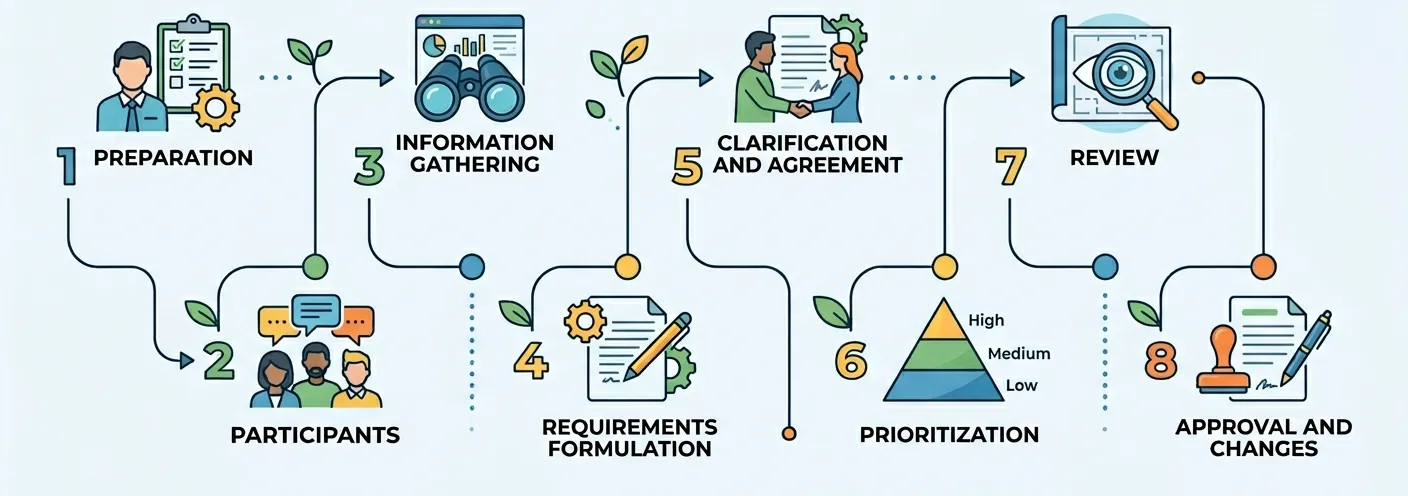
- Step 1. Preparation: Define the project’s high-level business goals and identify all key stakeholders before starting.
- Step 2. Participants: Assemble the right mix of subject matter experts, end-users, and technical leads to ensure complete coverage.
- Step 3. Information gathering: Utilize various elicitation techniques (interviews, workshops) to collect raw data, constraints, and user needs.
- Step 4. Requirements formulation: Translate the raw, messy data into clear, structured, and unambiguous documentation (like User Stories or an SRS).
- Step 5. Clarification and agreement: Review the formulated requirements with stakeholders to resolve conflicts, clarify vague terms, and ensure absolute alignment.
- Step 6. Prioritization: Rank the requirements (using methods like MoSCoW) to determine what must be built first for the initial launch.
- Step 7. Review: Conduct a final, formal walkthrough of the documentation with the technical team to confirm feasibility and effort estimates.
- Step 8. Approval and changes: Secure formal sign-off from stakeholders and establish a strict change control process to manage future feature requests.
A well-executed process turns chaos into order. By strictly following these steps, teams ensure no critical features are forgotten, and no impossible tasks are accidentally assigned to the developers.
Agile Requirements Gathering
In an Agile environment, requirements gathering is not a single, upfront phase; it is continuous. Requirements are captured as high-level “User Stories” and placed into a product backlog. During regular “backlog refinement” sessions, the team continuously gathers more details, breaks down large features, and adds acceptance criteria just before the development sprint begins, allowing for maximum flexibility.
Plan-Driven (Waterfall) Requirements Gathering
In a Waterfall approach, requirements gathering is a distinct, exhaustive phase at the very beginning of the project. Every detail is captured, analyzed, and documented in a massive Software Requirements Specification (SRS) document. This document requires formal, upfront sign-off, and any changes to the requirements later in the project must go through a rigid, formal Change Request process. In modern software engineering, most teams use a hybrid approach, combining upfront planning with flexible execution.
Requirements Gathering Tools
To execute this process efficiently, Business Analysts rely on a variety of requirements gathering tools and techniques. Selecting the right tool depends heavily on the project’s complexity, the availability of stakeholders, and the specific information needed.
| Tool | How it helps | Situations | Complexity | Setup speed | Typical output |
|---|---|---|---|---|---|
| Stakeholder interviews | Uncovers deep, specific insights and hidden pain points. | Executive alignment, complex niche workflows. | Medium | Medium | Interview transcripts, specific business rules. |
| Workshops / sessions | Builds rapid consensus among groups and resolves conflicts. | Cross-functional projects, initial project kickoff. | High | Slow | Brainstorming maps, agreed-upon feature lists. |
| Surveys | Collects quantitative data and broad user feedback easily. | Large, geographically distributed user bases. | Low | Fast | Statistical data, prioritized feature requests. |
| User observation | Reveals how work is actually done vs. how people say it’s done. | Rebuilding legacy internal tools, UI/UX redesigns. | High | Slow | Workflow diagrams, identified bottlenecks. |
| Document & data analysis | Provides a baseline understanding of existing systems. | System migrations, regulatory compliance projects. | Low | Fast | Data dictionaries, legacy system constraints. |
| Journey / scenario mapping | Visualizes the user’s emotional and physical steps to achieve a goal. | Consumer-facing apps, optimizing e-commerce flows. | Medium | Medium | Customer journey maps, UX flowcharts. |
| Prototyping | Validates requirements visually before writing backend code. | Highly interactive applications, uncertain user needs. | High | Slow | Clickable wireframes, visual mockups. |
| Req docs (Confluence, Docs) | Centralizes all requirements into a single source of truth. | Every project, from start to finish. | Low | Fast | SRS, PRD, structured user stories. |
| Priority methods (MoSCoW) | Forces stakeholders to make hard decisions about scope. | Budget-constrained projects, MVP planning. | Low | Fast | Prioritized product backlog. |
| AI tools | Speeds up documentation, summarizes meetings, and structures data. | Transcribing workshops, drafting initial acceptance criteria. | Low | Fast | Meeting summaries, structured user story drafts. |
AI Tools for Requirements Gathering
We are focusing on AI tools in more detail because Artificial Intelligence is currently the most disruptive and rapidly evolving technology in the modern Business Analyst’s toolkit. By early 2026, AI has transitioned from a simple transcription gimmick to a core productivity engine.
AI tools help in requirements gathering by instantly transcribing hours of messy stakeholder interviews, identifying contradictory requests across multiple documents, generating comprehensive edge cases for QA, and automatically structuring raw brainstorming notes into formal, developer-ready formats (like User Stories and Acceptance Criteria). This drastically reduces administrative overhead and accelerates the discovery phase.
Here are the top AI tools suitable for solving requirements gathering problems, ranked in descending order of effectiveness:
1. Anthropic Claude (Claude 4 - Sonnet 4.6 / Opus 4.6)
- Pros - Currently the industry gold standard for complex reasoning and technical documentation. It excels at processing massive, messy meeting transcripts and outputting highly structured, logical Product Requirements Documents (PRDs) without losing critical context. Its 1 million token context window - now generally available at flat standard pricing - means entire legacy documentation libraries, codebases, and multi-session discovery transcripts can be processed in a single pass with no surcharges.
- Cons - Requires manual copy-pasting for teams without API access, as it lacks out-of-the-box native integration with some enterprise project management suites like Jira or Confluence.
2. OpenAI ChatGPT (GPT-5.4)
- Pros - Exceptionally versatile with powerful reasoning capabilities. It is fantastic for rapid brainstorming, generating edge cases, and drafting initial acceptance criteria extremely quickly. GPT-5.4 Thinking shows you its reasoning plan upfront before executing, letting you redirect it mid-response - a significant time-saver when working through complex or conflicting requirements. Hallucination rates have also improved substantially compared to earlier versions.
- Cons - Still occasionally prone to “hallucinations” on technical constraints; requires careful prompt engineering to prevent it from inventing business rules. The 1M context window is only fully available via the API - the standard ChatGPT interface has a lower default limit, and prompts exceeding 272K tokens are billed at double the rate.
3. Google Gemini (Gemini 3.1 Pro)
- Pros - The strongest choice for teams working within Google Workspace. Embedded directly in Gmail, Docs, Sheets, Slides, Drive, and Meet, it turns requirements gathering into a seamless part of existing workflows - no context switching required. Its native multimodal capabilities (video, audio, images) are unique at this tier, allowing you to feed stakeholder meeting recordings directly into the model. Gemini 3.1 Pro also leads competitors on abstract reasoning benchmarks.
- Cons - Best value is tightly locked to the Google ecosystem; teams on Microsoft or neutral stacks get significantly less from it. Can sometimes struggle with the highly structured, formal formatting required for Software Requirements Specifications compared to Claude’s output.
4. Ecosystem-Native AI (Atlassian Rovo / Jira AI)
- Pros - Following its major early 2026 updates, Rovo has evolved from a background assistant into an accountable participant. You can now assign requirement-gathering tasks directly to Rovo agents, @mention them in comments to refine acceptance criteria in real-time, and embed them seamlessly into your existing workflows as active “teammates.”
- Cons - You are tightly locked into the Atlassian vendor ecosystem. Successfully embedding these agents requires a highly mature Jira setup, and the underlying categorization logic can still feel rigid if your project deviates from standard agile frameworks.
5. Autonomous Meeting Agents (Fireflies.ai / Otter.ai / Fathom)
- Pros - Automatically joins stakeholder meetings, transcribes conversations in real-time, and intelligently extracts actionable requirements and action items without any human intervention.
- Cons - Can misinterpret highly technical or niche industry jargon, and completely misses the nuanced subtext, body language, or hesitation of a stakeholder.
A Critical Warning: Despite these incredible capabilities, AI does not replace a human expert. A Business Analyst is still strictly required to navigate office politics, negotiate conflicting stakeholder priorities, and verify that the AI-generated logic actually aligns with real-world business goals. AI is a powerful co-pilot, but the human expert must always remain the pilot in command.
Deliverables and Best Practices
A successful requirements gathering phase results in tangible, actionable deliverables that the technical team can immediately use.
The primary deliverables include:
- Product requirements document (PRD) or SRS: The master document containing all business, functional, and non-functional requirements.
- User stories and acceptance criteria: The granular, developer-ready tasks written from the perspective of the end-user.
- Process flow diagrams: Visual representations of complex system logic and user journeys.
- Prioritized backlog: A ranked list of features dictating the development schedule.
To ensure these deliverables are of the highest quality, teams should follow core best practices:
- Use clear, concise language: Avoid ambiguous words like “fast,” “user-friendly,” or “robust.” Define exactly what those terms mean in measurable metrics.
- Validate constantly: Do not wait until the end of the month to show stakeholders the documentation. Review small batches of requirements weekly.
- Establish a change control process: Accept that requirements will change. Create a formal rule for how new requests are evaluated for budget and timeline impacts before they are added to the scope.
Advice: To avoid misunderstandings, always attach “Acceptance Criteria” to every functional requirement. Acceptance criteria are simple true/false statements that define exactly how a feature will be tested. If the developer and the stakeholder agree on how a feature will be tested before it is built, there can be no argument about whether it is “done.” Strong requirements gathering also depends on choosing the right development partner, so our guide on how to choose a software development company can help you understand what to look for before a project begins.
Requirements Gathering Template (Download)
To help you standardize your process, we have created a comprehensive, universal Requirements Gathering Template. This document provides a structured framework to capture project goals, constraints, diverse requirement types, and necessary sign-offs, ensuring no critical detail is overlooked during your discovery phase.
Download the requirements gathering template
Common Mistakes
Even experienced teams can stumble during the discovery phase. Knowing the most frequent pitfalls is the best way to keep your project on track.
- Assuming you know what the user wants: Skipping user interviews and relying solely on the opinions of upper management.
- Focusing on the “how” instead of the “what”: Allowing stakeholders to dictate technical solutions (e.g., “Use a dropdown menu”) instead of stating the problem (“Users need to select a country”).
- Using ambiguous language: Writing requirements that can be interpreted in multiple ways, leading to developer guesswork.
- Ignoring non-functional requirements: Forgetting to define security, speed, and scalability metrics until the app crashes under load.
- Failing to prioritize: Treating every single feature request as a “must-have,” which guarantees budget overruns.
The golden rule of requirements engineering is this: Requirements must not only be collected; they must be verified, clarified, and agreed upon. Raw data is useless until it has been critically analyzed, challenged for feasibility, and formally accepted by both the business and technical teams.
How Codemasters Helps with Requirements Gathering
At Codemasters International, we know that building the right software is just as important as building the software right. We don’t just ask you what you want; we partner with you to uncover what your business truly needs. Our dedicated Business Analysts and System Architects lead a comprehensive requirements gathering process designed to eliminate risks before a single line of code is written.
Here is what is included when you partner with us for Software Project Discovery:
- Deep-dive discovery sessions: We conduct targeted workshops and interviews with your key stakeholders to map out your exact business workflows.
- Technical feasibility analysis: Our senior architects evaluate your requests against current technology to ensure your vision is scalable and secure.
- Comprehensive documentation: We deliver a complete, structured Software Requirements Specification (SRS), user stories, and acceptance criteria.
- UX/UI wireframing: We create visual blueprints of your application so you can see and approve the user journey before development begins.
- Precise estimation: By defining the exact scope, we provide highly accurate budget and timeline projections.
Whether you need full custom software development or are looking for team extension to scale your existing project, starting with a clear roadmap is non-negotiable. Don’t let vague requirements derail your next big idea. Contact us today to schedule your Software Project Discovery session and build with confidence.
Conclusion
Requirements gathering is the critical first step in translating a business vision into a functional, successful digital product. By systematically discovering, documenting, and agreeing upon exactly what a software application must do—and how well it must do it—organizations protect their budgets, align their teams, and ensure the final product truly solves the users’ problems. It is the definitive bridge between a vague idea and flawless technical execution.
FAQ
How to do requirements gathering?
To do requirements gathering effectively, start by identifying all key stakeholders and defining the core business goals. Use a mix of requirements gathering techniques like interviews and workshops to uncover hidden needs. Document everything clearly, prioritize the features, and secure formal approval before any coding begins.
How to conduct a requirements gathering session?
Conduct a requirements gathering session by preparing a clear agenda and sharing it in advance. Set ground rules to keep the focus on “what” is needed, not “how” to build it. Ask open-ended questions, actively listen, record the session, and always send a summary for stakeholder validation afterward.
How to start requirements gathering?
Start requirements gathering by defining the high-level project vision and identifying your primary stakeholders. Before scheduling any interviews, review existing documentation, competitor products, or legacy systems. This preparation ensures you ask targeted, informed questions rather than wasting valuable stakeholder time on basic introductory concepts.
What are the best requirements gathering techniques?
The best requirements gathering techniques depend on your specific project. One-on-one interviews are excellent for deep insights, while group workshops build team consensus quickly. User observation is ideal for redesigning existing workflows, and surveys are perfect for collecting broad feedback from a large, distributed user base.